
Starting January 1, 2026, new state laws in Texas, Utah, and Louisiana will require Google Play developers to verify user ages, obtain parental approval for minors, and update how they handle user data. If your app serves users in these states, you'll need to integrate Google's new Play Age Signals API and redesign parts of your onboarding flow. Median.co’s AgeSafety native plugin simplifies this by providing a single integration for both iOS and Android. This guide covers the state-by-state requirements, API integration steps, user flow redesign, implementation timelines, and compliance requirements.
Starting in 2026, Apple App Store and Google Play are tightening age verification requirements in response to new state laws to protect minors online.
These changes go beyond COPPA and directly impact how apps onboard users, gate features, and handle parental consent. If your app is distributed in affected states, compliance is not optional.
How new state laws impact iOS and Android app stores
2026 brings a wave of new age verification requirements to both the Apple App Store and Google Play. Notably, three states (Texas, Utah, and Louisiana) have passed laws aimed at protecting minors online. California has already passed similar legislation (effective January 2027), and more states are likely to follow.
These laws build on existing frameworks like COPPA (which protects children under 13), but extend protections to all minors under 18. They represent a fundamental shift: age verification responsibility moves from individual apps to the platform level, with Apple and Google acting as gatekeepers.
This is all part of a broader response to concerns about teen mental health, harmful algorithmic content, and features designed to maximize engagement without age-appropriate boundaries.
So, what does this mean for developers? If your app is available in those three states, you'll need to integrate new APIs from both Apple and Google, update your onboarding process, and gate features based on age and parental approval status.
And doing so matters, because failing to comply could result in your app being removed from the app stores in those states. It could also mean serious regulatory penalties or facing other Google Play and iOS policy compliance issues.
Age verification laws: The state-by-state rollout
Each state has different requirements based on the legislation passed. As an app developer, you need to first understand what each of these state laws requires to stay compliant. While they share similar goals around minor protection, each law has its own timeline and specific requirements. Let’s zoom in on them:
Texas Senate Bill 2420
Texas’s senate bill took effect January 1, 2026. This law requires app stores to verify that users are at least 18 years old (or have parental approval) before they can download apps that could expose minors to harmful content. The law places responsibility on both Google Play and individual app developers to ensure compliance.
Utah's SB142
Utah’s bill follows on May 7, 2026. Utah's law focuses heavily on parental controls and requires that minors under 18 get explicit parental permission before creating accounts or accessing apps with social features or user-generated content. Apps must automatically apply the most restrictive privacy settings for users identified as under 18, and parents must actively opt in to loosen these restrictions.
Louisiana's age verification law
This goes into effect July 1, 2026. Louisiana's legislation includes specific provisions around data collection from minors and requires clear disclosure of how age-related data will be used.
Related Article Google Play Target API level requirements for Android apps in 2025
How Apple and Google are implementing age verification
Both Apple and Google have introduced new APIs to help developers comply with these laws. While the APIs serve the same purpose, they work differently on each platform.
Apple's approach: Declared Age Range API
Availability: iOS 26.0+, macOS 26.0+
Apple's Declared Age Range API returns a signal indicating the user's age range without exposing their exact birthdate.
Age brackets:
Under 13 ("Child")
13–15 ("Younger Teenager")
16–17 ("Older Teenager")
18+ ("Adult")
What you receive:
lowerBound: The minimum age of the user
upperBound: The maximum age (or nil for 18+)
declaration: The method of verification (selfDeclared vs. guardianDeclared)
Parental consent check: If the user is a minor, you must verify that the PermissionKit status is approved before allowing access to age-restricted features.
Google's approach: Play Age Signals API
Availability: Currently in beta, live January 1, 2026
Google's Play Age Signals API returns similar information with slightly different age brackets.
Age brackets:
0-12
13-15
16-17
18+
What you receive:
User age range (bracket, not exact age)
Parental approval status (yes/no signal)
Verification strength indicator
Privacy-first design: The API prohibits long-term storage of age data. Query the API when needed and make real-time decisions rather than caching age information.
How to implement age verification across iOS and Android
To implement the Google Play age verification policy, a simple update is not sufficient. You need to make real technical changes on how your app recieves age signals, controls access, and handles parental approval to stay compliant. Here's how to implement age verification in your app:
1. Integrate platform APIs into your app
You'll need to integrate both Apple's Declared Age Range API and Google's Play Age Signals API.
For iOS (26.0+):
Call AgeRangeService.shared.requestAgeRange(ageGates:)
Handle the response containing age bracket and verification method
Check PermissionKit status for minors before granting feature access
For Android:
Integrate Google's Play Age Signals API following their integration guide
Handle the returned age bracket and parental approval status
Build logic to query the API in real-time (no caching)
Fact: ThePlay Age Signals API integration guide provides technical documentation, code samples, and best practices. Google recommends starting integration as soon as possible. Note that the API will throw an exception until January 1, 2026, when it begins returning live responses for users in Texas.
Testing your implementation:
iOS: In Settings, go to Developer > Sandbox Apple Account > Age Assurance to simulate different scenarios
Android: Use Google's test environment to simulate different age ranges and approval states
2. Redesign your user flows
The goal of these laws is to protect minors, not just to verify their age. Once you know a user is under 18, your app needs to automatically create a safer, age-appropriate experience for them. Here's how to update your user flows:
Step 1: Design a seamless onboarding flow.
Build an experience that either requests age information upfront or explains that the app store is handling verification in the background. Keep the flow frictionless for adult users while clearly communicating the process to parents and minors.
Step 2: Build conditional logic to gate features.
Identify features that require age restrictions, such as social interactions, user-generated content, purchases, or messaging. Then build logic that shows or hides these features based on the user's age range and parental approval status.
Step 3: Add parental approval workflows.
Create clear pathways for parents to approve their child's app usage. Direct them to Apple's Family Sharing or Google's Family Link tools, or build your own parental consent mechanism that meets platform requirements. Make the approval process straightforward and explain what permissions parents are granting.
Step 4: Segment communications by age group.
Audit your push notifications, in-app messages, and email campaigns. Segment them by age brackets to ensure minors only receive age-appropriate content. Consider creating separate messaging templates for different age groups rather than one-size-fits-all communications.
3. Stay updated on implementation details
These laws are new, and both Apple and Google are actively updating their documentation as state regulators provide additional guidance.
For iOS developers:
Subscribe to Apple Developer News
Bookmark Apple's App Store Review Guidelines
Monitor legal challenges that could affect effective dates
For Android developers:
Subscribe to Google Play's developer newsletter
Bookmark the Play Age Signals API support page
Check regularly for updates on implementation requirements

Get hands-on with Median’s comprehensive documentation, and build your app with ease.

What are the privacy requirements for age verification?
Both Apple and Google have built privacy protections into their age verification APIs. You'll be subject to strict requirements:
Purpose limitation
You can only use age signals for compliance purposes. You cannot use this data for advertising targeting, user profiling, or any purpose beyond determining what features or content to show users.
Storage restrictions
Apple's requirements: No specific storage timeline mentioned, but data minimization principles apply.
Google's requirements: Google explicitly prohibits long-term storage of age signal data. Query the API when needed and make real-time decisions.
Texas-specific requirement: You must delete any age-related personal data received from either platform as soon as verification is complete.
Trust and safety guidelines
Using these APIs means agreeing to Apple's and Google's trust and safety policies. Violations can result in:
API access being revoked
Your app being removed from stores
Enforcement actions from state attorneys general
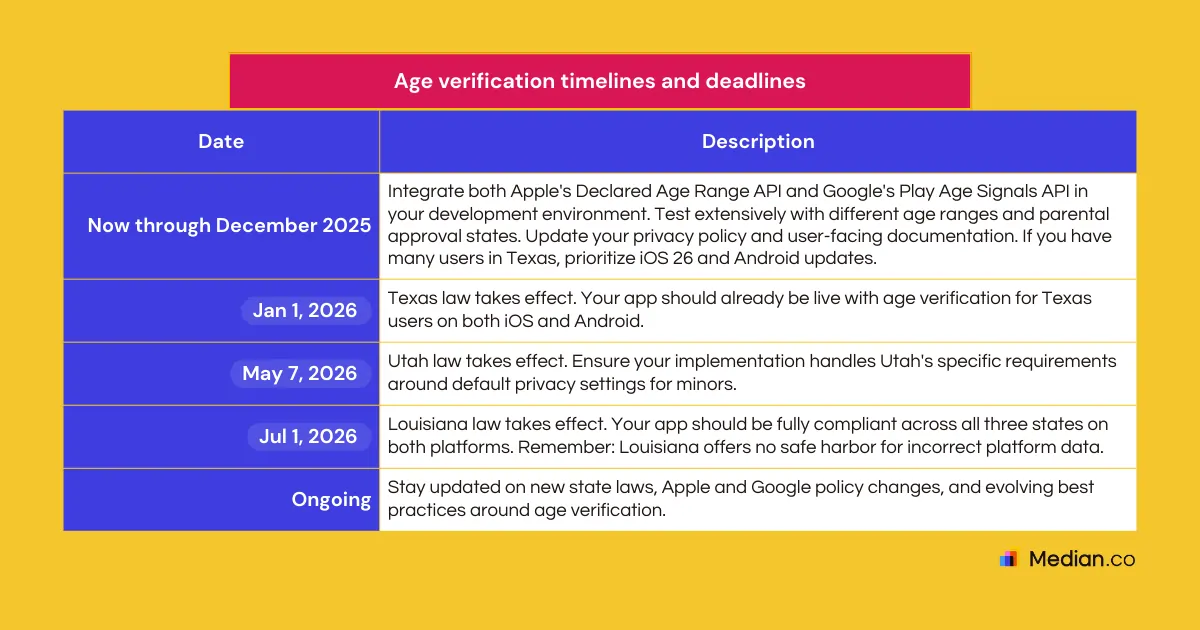
Age verification timelines and deadlines
These laws have already taken effect as of January 2026. To remain compliant, you must account for development time, testing, and app store review and approval. The roadmap below outlines the required implementation steps.
Developer age verification preparation checklist
To ensure you're ready for the January 1, 2026 deadline, complete the following:
Technical implementation
Update iOS deployment target to 26.0+ for Texas users
Integrate Apple's Declared Age Range API
Integrate Google's Play Age Signals API
Build age bracket detection logic for both platforms
Implement feature gating based on age and approval status
Content and metadata
Audit In-App Purchases and assign age ratings to individual APs on both platforms
Update privacy policies to disclose age signal processing
Create age-appropriate content filters
Segment messaging templates by age group
Implementing age verification with Median.co
These state laws represent a fundamental shift in how mobile apps handle age verification and parental consent. What starts in three states will likely expand nationwide, so the work you do now will matter long-term.
The challenge: You need to integrate two separate APIs (Apple's and Google's), build platform-specific logic, and maintain compliance with three different state laws—all while keeping your codebase manageable.
The fix: Median's AgeSafety native plugin. This plugin offers a unified JavaScript integration that handles age verification on both iOS and Android.
Here's how the Median.co AgeSafety native plugin works:
Cross-platform from the start: Median.co's AgeSafety native plugin ensures compliance with both Google's Play Age Signals API (Android) and Apple's Declared Age Range (iOS), so you only need to build your age verification logic once.
No data collection: The plugin passes through age signals from iOS and Android without collecting or storing data from your users.
JavaScript-based: If you're already building a web app with us, adding age verification is straightforward JavaScript.
The new laws require specific functionality, and the AgeSafety native plugin covers it:
Apply age-appropriate content filters
Gate features based on age (show/hide for 18+)
Block purchases for minors
Check when parental approval is required
Detect parental supervision status
Launch a full-feature native app without native development!

Ready to get started?
The laws are already in motion since January 1, 2026, for Texas users. That might seem far away, but between planning, development, testing, and app store approval, the time to start is now.
Read our complete AgeSafety implementation guide for step-by-step instructions, code examples, and best practices.
If you're already building with Median, adding age verification is a straightforward update. If you're new to Median, our platform lets you convert your web app into native iOS and Android apps without native development, and includes powerful native plugins like AgeSafety to help you meet compliance requirements.
Questions about implementing age verification? Contact our team to discuss your specific needs.
Frequently asked questions
What do Apple and Google handle vs. what you need to implement?
Apple and Google handle age verification before users download your app. Users go through verification at the app store level, not within your app.
Your responsibility begins once a user opens your app. You'll integrate their APIs to receive age verification data, then use that information to show or hide features, gate content, and ensure minors have parental approval where required.
In short: Apple and Google verify who the user is. You control what they can access in your app.
How are the iOS and Android implementations different?
The APIs serve the same purpose but work differently:
Age brackets: Apple uses Under 13, 13–15, 16–17, 18+. Google uses 0-12, 13-15, 16-17, 18+.
Technical approach: Apple's API is part of iOS 26.0+ system frameworks. Google's API is integrated through Google Play Services.
Data handling: Both prohibit using age data for non-compliance purposes, but Google explicitly requires real-time API queries with no caching. Texas law requires immediate deletion regardless of platform.
Testing: Apple provides sandbox testing in iOS Settings. Google provides a beta test environment.
What happens if you don't comply with age verification requirements?
Non-compliance isn't an option. Apps that don't implement age verification in states where it's required will face real consequences.
Both Apple and Google will likely remove non-compliant apps from their stores in affected states. You might continue serving users in other states, but losing access to markets as large as Texas represents a significant business impact.
Beyond store removal, you could face enforcement actions from state attorneys general. These laws include penalties for violations, and states have shown they're willing to pursue legal action against companies that don't take minor protection seriously.
What's the difference between the Texas, Utah, and Louisiana laws?
While all three laws require age verification and parental approval, there are key differences:
Texas: Focuses on per-transaction consent and requires immediate deletion of age data. Provides safe harbor if you rely on platform data in good faith.
Utah: Emphasizes default privacy settings for minors (most restrictive by default). Requires parents to actively opt in to loosen restrictions. Provides safe harbor.
Louisiana: Includes specific provisions around data collection disclosure. Does not provide safe harbor—you could be held liable even if Apple or Google provides incorrect data.
Do these laws apply if my company isn't based in these states?
Yes. These laws apply based on the user's location, not where your company is based. If you have users in Texas, Utah, or Louisiana, you must comply with their respective laws.
Both Apple and Google use location signals to determine which users are subject to these laws, and they provide that information through their APIs.
*DISCLAIMER: This content is provided solely for informational purposes. It is not exhaustive and may not be relevant for your requirements. While we have obtained and compiled this information from sources we believe to be reliable, we cannot and do not guarantee its accuracy. This content is not to be considered professional advice and does not form a professional relationship of any kind between you and GoNative.io LLC or its affiliates. Median.co is the industry-leading end-to-end solution for developing, publishing, and maintaining native mobile apps for iOS and Android powered by web content. When considering any technology vendor we recommend that you conduct detailed research and "read the fine print" before using their services.*