Mobile apps provide stronger security than websites by leveraging hardware-backed encryption, biometric authentication, and operating system sandboxing. Unlike web portals that rely on browser-based protections, native apps integrate directly with device hardware and OS controls, enabling features like secure key storage and certificate pinning. The result: Better protection of sensitive data, stronger authentication, and reduced attack surfaces for business portals.
It’s clear: Mobile apps deliver significantly stronger security than websites for employee and customer portals.
While both serve helpful purposes, mobile and web security differ fundamentally, with native iOS and Android platforms offering advanced protections that web-based solutions cannot match.These include hardware-backed encryption, biometric authentication, and operating system sandboxing, which collectively safeguard sensitive enterprise data more effectively than traditional web environments.
Try it for free!
Enter any URL to build a customer portal app
Unlike websites, which rely heavily on browser security and server-side protections, mobile apps benefit from direct integration with the device’s operating system and hardware. This integration enables features such as secure key storage, app isolation, and certificate pinning, providing a stronger defense against common cyber-security threats.
That’s why mobile apps offer a more resilient framework for protecting confidential information and ensuring compliance with strict security standards in business portals—a fact that developers cannot ignore.
What is mobile platform security architecture? A breakdown
Both iOS and Android enforce security at the operating system level through hardware-backed key storage, mandatory code signing, and strict process isolation controls.
These built-in platform protections allow mobile apps to apply strong encryption, secure authentication, and strict sandboxing by default, which reduces the overall attack surface compared to browser-based environments.
Here’s the real advantage mobile has over the web: Browser security depends heavily on how each browser behaves, which can vary by device, version, extensions, and even user settings.
Native apps, on the other hand, sit directly on top of consistent operating system controls and hardware-backed protections like Apple’s Secure Enclave and theAndroid Keystore system.
When combined with safeguards like jailbreak and root detection that prevent apps from running on compromised devices, this creates a far more controlled and predictable security foundation.
This tight OS and hardware integration enables native support for certificate pinning, biometric authentication, and encrypted local storage, resulting in a stronger security posture that is far less exposed to common web-based attack vectors.
Let’s break that down further.
iOS security infrastructure
Apple’s Secure Enclave provides hardware-isolated key storage that hackers cannot extract even with physical device access. Touch ID and Face IDintegrate directly with this enclave, enabling biometric authentication that websites cannot replicate.
App sandboxing ensures each application operates in isolation—preventing malicious code from accessing data stored by other apps.
Mandatory code signing means only verified, unmodified binaries run on devices, with developers unable to bypass these controls.
Android security framework
Android’s permission model grants users granular control over what data apps can access. App isolation through Linux kernel separation prevents unauthorized interaction between applications.
SafetyNet and Play Integrity API detect rooted devices or emulators, enabling apps to refuse operation on compromised platforms.
What are critical security gaps in web-based solutions?
Web-based portals carry structural security limitations that are difficult to eliminate because they operate inside the browser layer.
Unlike native apps, they cannot fully control the execution environment, hardware protections, or authentication mechanisms.
That architectural difference creates predictable risk categories, like the following:
Browser-based attack surface
Websites operate entirely within the browser, and browser security varies by device, version, extensions, and user configuration.
That inconsistency increases exposure to threats such as cross-site scripting, CSRF, and man-in-the-middle attacks.
Because browsers load and execute content from multiple domains at once, malicious sites can exploit that behavior to steal credentials or trigger unauthorized actions.
Data storage limitations
Browser local storage is not encrypted by default.
Session cookies, which handle most web authentication, can be intercepted or hijacked if not properly secured.
Depending on how the app is implemented, native apps can reduce this risk by storing credentials in hardware backed keystores that are isolated from other apps and the browser layer.
Technical security comparison: Apps vs. websites
The security differences between native mobile apps and browser-based portals are not theoretical. They directly impact data protection, authentication strength, and overall risk exposure.
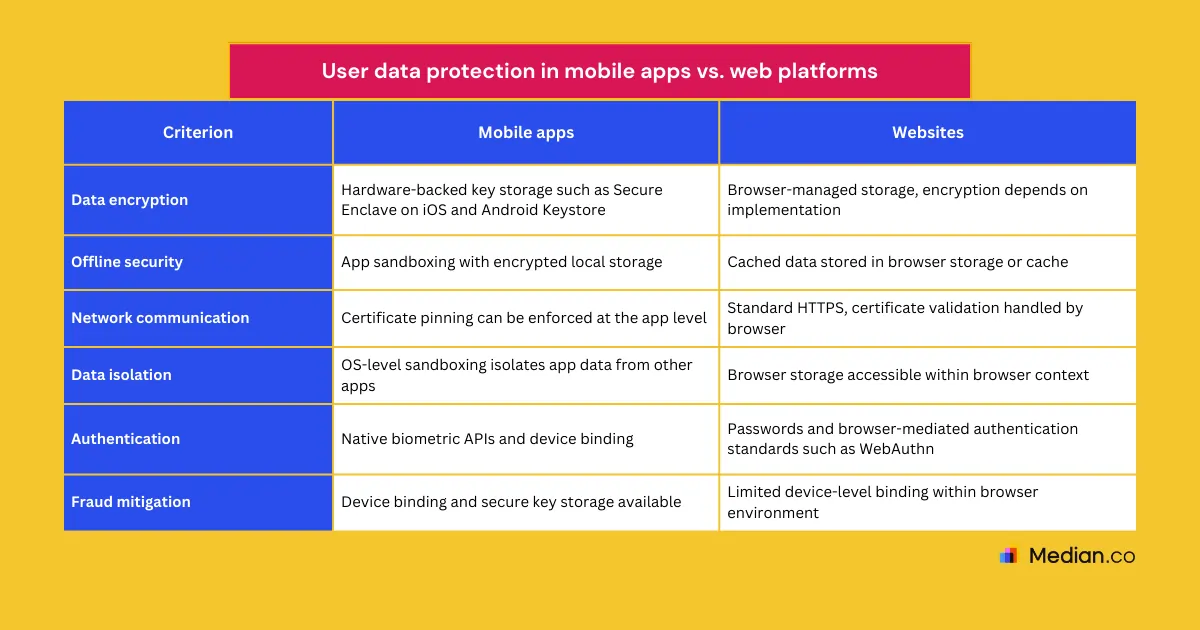
Biometric authentication: Native apps invoke device biometrics directly through OS APIs. Web apps rely on browser-mediated standards like WebAuthn with less control over the flow.
Hardware-backed key storage: Apps store cryptographic keys in platform keystores such as Secure Enclave on iOS and Android Keystore. Web apps depend on browser-managed credentials and session tokens.
Multi-factor authentication: Apps can tightly bind MFA to the device and secure storage. Web apps often rely on passwords plus external factors such as SMS or email.
Device binding: Apps can securely bind credentials or certificates to a specific device. Web apps primarily use cookies or tokens that require extra protections against theft.
User data Protection in mobile apps vs. web platforms
For businesses handling sensitive data—financial records, health information, employee credentials—mobile apps and websites offer different approaches to data protection, with mobile apps leveraging native platform features to enhance security.
Organizations using website to app makers must evaluate whether those solutions preserve native security capabilities such as hardware-backed key storage, certificate pinning, secure local storage, and biometric authentication.
Not all wrappers deliver true native security controls.
Employee portal security enhancement
Converting employee portals into native mobile apps allows tighter integration withenterprise identity systems, device-level authentication, and secure credential storage.
Features such as client certificate storage, device binding, and VPN configuration are more controlled in native environments than in web-based mobile portals.
Apps distributed through official app stores also benefit from controlled update mechanisms, allowing vendors to push security patches and enforce version compliance rather than relying solely on users refreshing or revisiting web pages.
In enterprise environments, this is further strengthened through Mobile Device Management (MDM), which enables organizations to enforce secure device configurations and app policies across managed devices.
Customer portal protection
Native apps allow stronger device binding and hardware-backed credential storage, enabling more reliable fraud detection than browser-based portals. While web applications can use browser-level fingerprinting, it is more limited and privacy-constrained.
Biometric authentication in native customer apps reduces reliance on passwords while strengthening access control through OS-level integration.
Push notifications delivered through platform messaging services provide a more immediate and controlled channel for security alerts compared to email, which may be delayed or ignored.
Compliance and regulatory benefits
Mobile application security testing tools verify GDPR, HIPAA, and SOX compliance more reliably than web security audits. Hardware encryption satisfies regulatory requirements for sensitive information protection that browser-based storage cannot meet.
Conclusion and Implementation Strategy
Native apps can leverage hardware-backed encryption and secure key storage to support regulatory requirements under frameworks such as GDPR, HIPAA, SOC 2, ISO 27001, and SOX.
Compliance is not automatic, but native controls can make strong data protection and credential isolation easier to enforce than in browser-based environments.
Your immediate next steps could look like this:
Audit current web portal vulnerabilities against native mobile security controls
Prioritize migration of portals handling sensitive or regulated data
Establish ongoing security monitoring aligned with app store compliance standards
Many mobile applications fail security assessments because they underuse native platform capabilities. Ensure your implementation fully leverages iOS and Android security infrastructure instead of simply reproducing web functionality on mobile devices.
Progressive Web Apps combine features of both websites and mobile apps, but they lack full access to device hardware and OS-level security controls. While PWAs use HTTPS and can implement some security measures, they generally do not provide the same robust protections like hardware-backed encryption and biometric authentication found in native apps.
How do app store policies impact mobile app security compared to websites?
Mobile apps distributed through trusted sources like the Google Play Store and Apple App Store undergo vetting processes that help identify and remove malicious software. This app store oversight provides an additional layer of security not typically available for websites, which can be launched without any centralized review.
Are mobile apps more vulnerable to reverse engineering than websites?
Yes, mobile app binaries are stored on user devices and can be decompiled or reverse engineered by attackers to discover vulnerabilities or steal intellectual property. Websites, in contrast, keep most business logic on the server side, making it harder for attackers to access the underlying code.
How does offline functionality in mobile apps influence security considerations?
While the ability of mobile apps to work offline is a significant advantage for user experience, it also introduces security challenges. Sensitive data stored locally must be encrypted and protected against unauthorized access, as offline data cannot benefit from real-time server-side security updates or monitoring.
*DISCLAIMER: This content is provided solely for informational purposes. It is not exhaustive and may not be relevant for your requirements. While we have obtained and compiled this information from sources we believe to be reliable, we cannot and do not guarantee its accuracy. This content is not to be considered professional advice and does not form a professional relationship of any kind between you and GoNative.io LLC or its affiliates. Median.co is the industry-leading end-to-end solution for developing, publishing, and maintaining native mobile apps for iOS and Android powered by web content. When considering any technology vendor we recommend that you conduct detailed research and "read the fine print" before using their services.*